<?xml version="1.0" encoding="utf-8"?>
<feed xmlns="http://www.w3.org/2005/Atom">
    <id>https://docs.praxi.au/blog</id>
    <title>Praxi Help Centre Blog</title>
    <updated>2026-03-15T00:00:00.000Z</updated>
    <generator>https://github.com/jpmonette/feed</generator>
    <link rel="alternate" href="https://docs.praxi.au/blog"/>
    <subtitle>Praxi Help Centre Blog</subtitle>
    <icon>https://docs.praxi.au/img/favicon.ico?v=brand-20261005-rounded</icon>
    <entry>
        <title type="html"><![CDATA[Introducing AI Voice Transcription & Live Clinical Guidance]]></title>
        <id>https://docs.praxi.au/blog/2026/03/15/voice-transcription-launch</id>
        <link href="https://docs.praxi.au/blog/2026/03/15/voice-transcription-launch"/>
        <updated>2026-03-15T00:00:00.000Z</updated>
        <summary type="html"><![CDATA[We are excited to announce the launch of AI-powered voice transcription in]]></summary>
        <content type="html"><![CDATA[<p>We are excited to announce the launch of AI-powered voice transcription in
Praxi, bringing real-time clinical documentation assistance directly into your
sessions.</p>
<h2 class="anchor anchorTargetStickyNavbar_uTKd" id="real-time-streaming-transcription">Real-Time Streaming Transcription<a href="https://docs.praxi.au/blog/2026/03/15/voice-transcription-launch#real-time-streaming-transcription" class="hash-link" aria-label="Direct link to Real-Time Streaming Transcription" title="Direct link to Real-Time Streaming Transcription" translate="no">​</a></h2>
<p>Praxi now captures speech during clinical sessions and converts it to text in
real time using Australian English language models with speaker diarisation. The
streaming pipeline processes audio in 100-millisecond chunks, delivering interim
and final transcript segments to your screen with minimal latency.</p>
<p>Transcripts appear in a dedicated drawer alongside your session interface,
clearly distinguishing between practitioner and client speech. You can review,
edit, and annotate transcript segments at any point during or after the session.</p>
<h2 class="anchor anchorTargetStickyNavbar_uTKd" id="live-clinical-note-generation">Live Clinical Note Generation<a href="https://docs.praxi.au/blog/2026/03/15/voice-transcription-launch#live-clinical-note-generation" class="hash-link" aria-label="Direct link to Live Clinical Note Generation" title="Direct link to Live Clinical Note Generation" translate="no">​</a></h2>
<p>As the session progresses, Praxi generates structured clinical note sections
progressively — approximately every five minutes. These draft sections follow
your preferred note template (DAP, SOAP, or custom formats) and are presented
for your review. Nothing is finalised without your explicit approval.</p>
<p>The structured extraction pipeline identifies nine categories of clinical fact
from the transcript, including presenting issues, interventions used, client
responses, risk indicators, homework assigned, and session themes.</p>
<h2 class="anchor anchorTargetStickyNavbar_uTKd" id="clinical-guidance-from-praxi">Clinical Guidance from Praxi<a href="https://docs.praxi.au/blog/2026/03/15/voice-transcription-launch#clinical-guidance-from-praxi" class="hash-link" aria-label="Direct link to Clinical Guidance from Praxi" title="Direct link to Clinical Guidance from Praxi" translate="no">​</a></h2>
<p>During sessions, Praxi can surface real-time clinical suggestions based on the
conversation. These include evidence-based intervention prompts, risk alerts
when concerning language is detected, and theme tracking across sessions. You
can also ask Praxi questions directly using the "Ask Praxi" feature in the
guidance panel.</p>
<p>All AI suggestions are clearly marked with confidence indicators so you can
assess their reliability at a glance.</p>
<h2 class="anchor anchorTargetStickyNavbar_uTKd" id="session-memory">Session Memory<a href="https://docs.praxi.au/blog/2026/03/15/voice-transcription-launch#session-memory" class="hash-link" aria-label="Direct link to Session Memory" title="Direct link to Session Memory" translate="no">​</a></h2>
<p>When you sign a clinical note, Praxi automatically consolidates key information
into session memory. This memory is available to Praxi in future sessions,
providing longitudinal context about the client's therapeutic journey —
including themes, progress, homework completion, and treatment milestones.</p>
<p>Theme tracking follows a lifecycle from emerging to active to resolving to
resolved, giving you a clear view of the client's trajectory over time.</p>
<h2 class="anchor anchorTargetStickyNavbar_uTKd" id="privacy-and-consent">Privacy and Consent<a href="https://docs.praxi.au/blog/2026/03/15/voice-transcription-launch#privacy-and-consent" class="hash-link" aria-label="Direct link to Privacy and Consent" title="Direct link to Privacy and Consent" translate="no">​</a></h2>
<p>Voice transcription in Praxi is built with Australian Privacy Act 1988
compliance at its core:</p>
<ul>
<li class=""><strong>Recording consent is mandatory</strong> — Transcription cannot begin until the
client has provided explicit consent, recorded in their client record.</li>
<li class=""><strong>Separate AI processing consent</strong> — An additional consent flag is required
before AI analysis (note generation, theme tracking, clinical guidance) is
applied to transcripts.</li>
<li class=""><strong>Configurable audio retention</strong> — Audio retention is a per-organisation
policy: from a 72-hour default down to a zero-retention mode that destroys
audio the moment transcription completes. After the configured retention
expires, audio is permanently deleted.</li>
<li class=""><strong>Transcript retention</strong> — Transcript retention is configurable per
organisation, and transcripts are encrypted at rest. Once the clinical note is
signed, the transcript is redacted and only the structured note remains.</li>
<li class=""><strong>Couples and group sessions</strong> — Multi-speaker sessions require consent from
all participants. Three consent models are available: no secrets (all content
shared), secrets (practitioner-only segments), and case-by-case (per-session
decision).</li>
</ul>
<p>Your practice's consent settings are managed in <strong>Settings &gt; AI &gt; Consent</strong>.</p>
<h2 class="anchor anchorTargetStickyNavbar_uTKd" id="audio-quality-tips">Audio Quality Tips<a href="https://docs.praxi.au/blog/2026/03/15/voice-transcription-launch#audio-quality-tips" class="hash-link" aria-label="Direct link to Audio Quality Tips" title="Direct link to Audio Quality Tips" translate="no">​</a></h2>
<p>For the best transcription accuracy:</p>
<ol>
<li class=""><strong>Use a quality microphone</strong> — Built-in laptop microphones work but external
USB microphones or headsets significantly improve accuracy.</li>
<li class=""><strong>Reduce background noise</strong> — Close windows, turn off fans, and use a quiet
room.</li>
<li class=""><strong>Speak naturally</strong> — The Australian English model handles natural speech
patterns well. No need to speak slowly or artificially clearly.</li>
<li class=""><strong>Monitor the quality indicator</strong> — The audio quality badge in the session
toolbar shows real-time mic level and connection quality. Green means good;
amber suggests adjustments may help.</li>
</ol>
<h2 class="anchor anchorTargetStickyNavbar_uTKd" id="availability">Availability<a href="https://docs.praxi.au/blog/2026/03/15/voice-transcription-launch#availability" class="hash-link" aria-label="Direct link to Availability" title="Direct link to Availability" translate="no">​</a></h2>
<p>Voice transcription is available as a per-seat add-on on all paid plans — see
the <a href="https://praxi.au/pricing" target="_blank" rel="noopener noreferrer" class="">pricing page</a> for current add-on tiers and
inclusions. Batch (post-session) and streaming (live notes) modes, dictation,
and audio upload are all included; multi-speaker couples/group transcription
follows your plan's couples/group feature availability.</p>
<p>To get started, navigate to <strong>Settings &gt; AI &gt; Transcription</strong> to enable AI
processing consent, then start a session and click the microphone icon in the
session toolbar.</p>
<h2 class="anchor anchorTargetStickyNavbar_uTKd" id="learn-more">Learn More<a href="https://docs.praxi.au/blog/2026/03/15/voice-transcription-launch#learn-more" class="hash-link" aria-label="Direct link to Learn More" title="Direct link to Learn More" translate="no">​</a></h2>
<ul>
<li class=""><a class="" href="https://docs.praxi.au/docs/features/sessions/voice-transcription-setup">Voice Transcription Setup</a>
— Enabling and configuring transcription</li>
<li class=""><a class="" href="https://docs.praxi.au/docs/features/sessions/in-session-tools">In-Session Tools</a> — Recording
controls and session interface</li>
<li class=""><a class="" href="https://docs.praxi.au/docs/features/clinical-notes/creating-notes">Clinical Notes</a> — How AI
generates structured notes</li>
<li class=""><a class="" href="https://docs.praxi.au/docs/features/sessions/session-memory">Session Memory</a> — Longitudinal client
context</li>
<li class=""><a class="" href="https://docs.praxi.au/docs/features/sessions/live-guidance">Live Guidance</a> — Real-time clinical
suggestions from Praxi</li>
</ul>]]></content>
        <author>
            <name>Praxi Team</name>
            <uri>https://praxi.au</uri>
        </author>
        <category label="release" term="release"/>
        <category label="ai" term="ai"/>
        <category label="transcription" term="transcription"/>
    </entry>
    <entry>
        <title type="html"><![CDATA[Billing Overhaul: Medicare MCOL, Batch Invoicing & Payment Recovery]]></title>
        <id>https://docs.praxi.au/blog/2026/03/01/billing-enhancements</id>
        <link href="https://docs.praxi.au/blog/2026/03/01/billing-enhancements"/>
        <updated>2026-03-01T00:00:00.000Z</updated>
        <summary type="html"><![CDATA[This release delivers a major overhaul of Praxi's billing capabilities, with]]></summary>
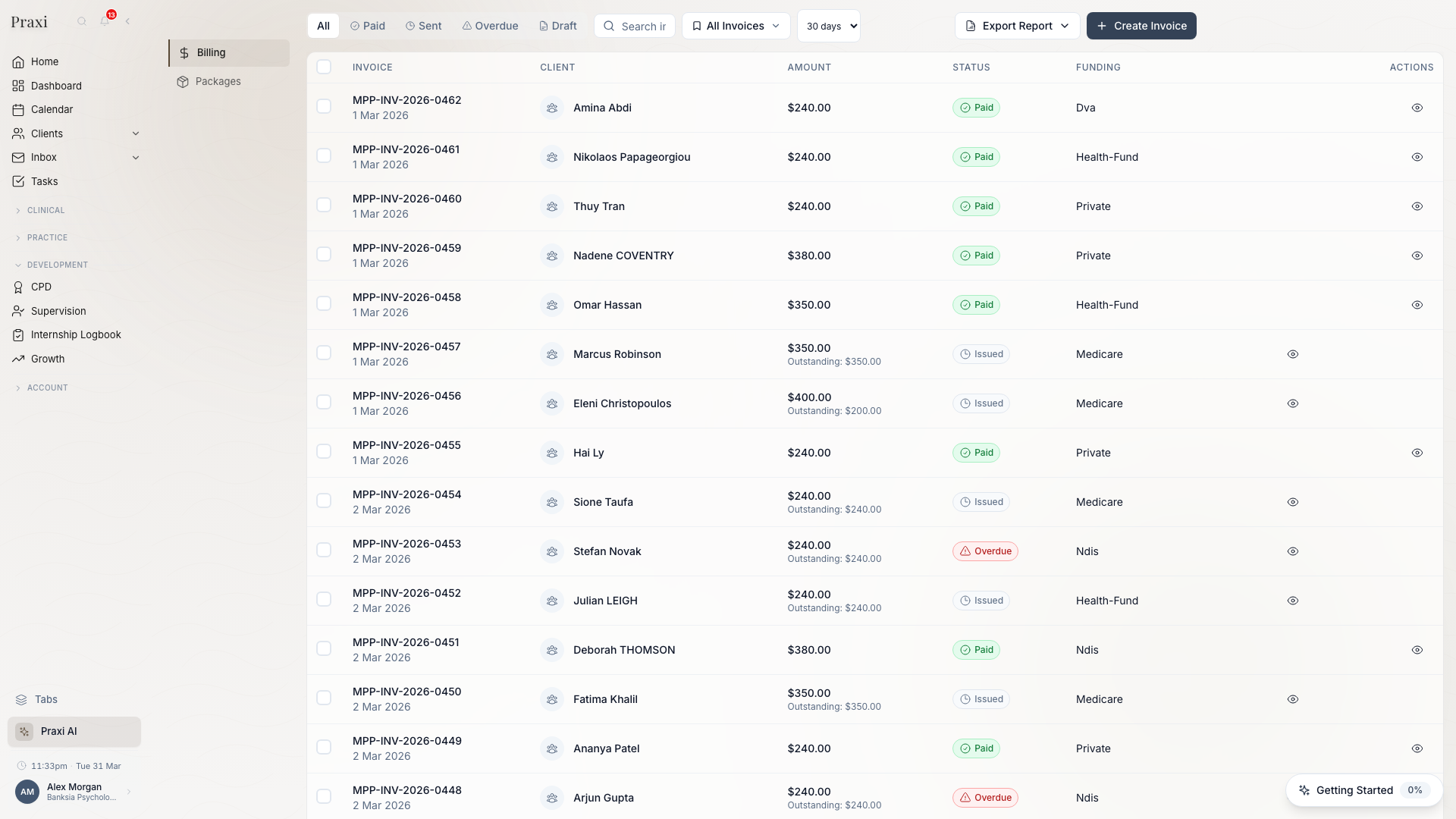
        <content type="html"><![CDATA[<p>This release delivers a major overhaul of Praxi's billing capabilities, with
Medicare Claiming Online (MCOL) integration, batch invoicing, automated payment
recovery, and DVA claiming improvements.</p>
<h2 class="anchor anchorTargetStickyNavbar_uTKd" id="medicare-claiming-online-mcol-integration">Medicare Claiming Online (MCOL) Integration<a href="https://docs.praxi.au/blog/2026/03/01/billing-enhancements#medicare-claiming-online-mcol-integration" class="hash-link" aria-label="Direct link to Medicare Claiming Online (MCOL) Integration" title="Direct link to Medicare Claiming Online (MCOL) Integration" translate="no">​</a></h2>
<p><img decoding="async" loading="lazy" alt="Billing Dashboard" src="https://docs.praxi.au/assets/images/billing-overview-23efc742578d3dacb006b5c06cd949b8.png" width="1920" height="1080" class="img_mROJ"></p>
<div class="theme-admonition theme-admonition-info admonition_cyJG alert alert--info"><div class="admonitionHeading_hyYq"><span class="admonitionIcon_RLwv"><svg viewBox="0 0 14 16"><path fill-rule="evenodd" d="M7 2.3c3.14 0 5.7 2.56 5.7 5.7s-2.56 5.7-5.7 5.7A5.71 5.71 0 0 1 1.3 8c0-3.14 2.56-5.7 5.7-5.7zM7 1C3.14 1 0 4.14 0 8s3.14 7 7 7 7-3.14 7-7-3.14-7-7-7zm1 3H6v5h2V4zm0 6H6v2h2v-2z"></path></svg></span>info</div><div class="admonitionContent_EqJb"><p>Update Praxi's direct Medicare claiming integration is completing Services
Australia conformance testing. Production claiming becomes available once
Services Australia grants the Notice of Integration (NOI).</p></div></div>
<p>Praxi's billing module now includes direct electronic claiming through Medicare
Online Claiming. Claims are submitted electronically using your PRODA B2B device
credentials, eliminating the need for paper forms or third-party claiming
software.</p>
<p>Key capabilities include:</p>
<ul>
<li class=""><strong>Real-time eligibility checks</strong> before submitting claims, reducing rejection
rates.</li>
<li class=""><strong>Bulk bill and patient claim</strong> submission with automatic assignment of
benefit handling.</li>
<li class=""><strong>Claim status tracking</strong> with real-time updates from Services Australia.</li>
<li class=""><strong>Automated reconciliation</strong> that matches Medicare payment reports against
your Praxi invoices, flagging discrepancies for review.</li>
</ul>
<p>Setup requires a valid PRODA account and linked Medicare provider numbers. See
<strong>Settings &gt; Integrations &gt; Medicare</strong> to configure your credentials.</p>
<h2 class="anchor anchorTargetStickyNavbar_uTKd" id="batch-invoicing">Batch Invoicing<a href="https://docs.praxi.au/blog/2026/03/01/billing-enhancements#batch-invoicing" class="hash-link" aria-label="Direct link to Batch Invoicing" title="Direct link to Batch Invoicing" translate="no">​</a></h2>
<p>Practices can now generate invoices in bulk rather than one at a time. Select
multiple appointments from the calendar or client list, review the batch
summary, and generate all invoices with a single action.</p>
<p>Batch invoicing supports mixed funding sources within the same batch — Medicare,
DVA, NDIS, WorkCover, and private invoices are all handled correctly. Each
invoice is created with the appropriate item codes, rates, and payer details
based on the client's funding configuration.</p>
<p>Batch operations are processed in the background and you receive a notification
when the batch is complete, along with a summary of any items that require
attention.</p>
<h2 class="anchor anchorTargetStickyNavbar_uTKd" id="failed-payment-recovery">Failed Payment Recovery<a href="https://docs.praxi.au/blog/2026/03/01/billing-enhancements#failed-payment-recovery" class="hash-link" aria-label="Direct link to Failed Payment Recovery" title="Direct link to Failed Payment Recovery" translate="no">​</a></h2>
<p>Praxi now automatically detects failed payment plan instalments and initiates a
recovery workflow. When a scheduled payment fails (due to expired cards,
insufficient funds, or declined transactions), the system:</p>
<ol>
<li class="">Retries the payment after a configurable delay.</li>
<li class="">Sends the client a notification with a link to update their payment method.</li>
<li class="">Escalates to the practice administrator if recovery is not resolved within
the configured timeframe.</li>
</ol>
<p>This reduces the administrative burden of chasing failed payments and improves
collection rates without manual intervention.</p>
<h2 class="anchor anchorTargetStickyNavbar_uTKd" id="dva-claiming-improvements">DVA Claiming Improvements<a href="https://docs.praxi.au/blog/2026/03/01/billing-enhancements#dva-claiming-improvements" class="hash-link" aria-label="Direct link to DVA Claiming Improvements" title="Direct link to DVA Claiming Improvements" translate="no">​</a></h2>
<p>DVA claiming now supports electronic submission through the same ECLIPSE pathway
as Medicare. White Card and Gold Card claims are differentiated automatically
based on the client's DVA details, and the correct provider number is applied
per claim.</p>
<h2 class="anchor anchorTargetStickyNavbar_uTKd" id="prerequisites">Prerequisites<a href="https://docs.praxi.au/blog/2026/03/01/billing-enhancements#prerequisites" class="hash-link" aria-label="Direct link to Prerequisites" title="Direct link to Prerequisites" translate="no">​</a></h2>
<p>Before using these features, ensure:</p>
<ul>
<li class=""><strong>For Medicare MCOL</strong>: A valid PRODA B2B device certificate is registered and
your Medicare provider numbers are linked in Praxi. See the
<a class="" href="https://docs.praxi.au/docs/features/integrations/medicare-setup">Medicare setup guide</a> for
detailed steps.</li>
<li class=""><strong>For Batch Invoicing</strong>: Client records must have their funding sources
configured (Medicare number, DVA file number, NDIS plan details, or private
billing defaults). Appointments must be in "attended" status.</li>
<li class=""><strong>For Payment Recovery</strong>: Stripe integration must be active with saved payment
methods on file. Configure retry intervals and escalation timeframes in
<strong>Settings &gt; Billing &gt; Payment Plans</strong>.</li>
</ul>
<h2 class="anchor anchorTargetStickyNavbar_uTKd" id="reporting-enhancements">Reporting Enhancements<a href="https://docs.praxi.au/blog/2026/03/01/billing-enhancements#reporting-enhancements" class="hash-link" aria-label="Direct link to Reporting Enhancements" title="Direct link to Reporting Enhancements" translate="no">​</a></h2>
<p>Alongside invoicing improvements, the billing reports dashboard now includes:</p>
<ul>
<li class=""><strong>Claim Submission Report</strong> — Track Medicare and DVA claim statuses, rejection
reasons, and resubmission rates.</li>
<li class=""><strong>Ageing Receivables</strong> — View outstanding balances by client, funding source,
and age bracket (30/60/90+ days).</li>
<li class=""><strong>Revenue by Practitioner</strong> — Compare monthly revenue across your team with
drill-down by funding source.</li>
<li class=""><strong>Batch Processing History</strong> — Audit trail of all batch operations with
individual invoice outcomes.</li>
</ul>
<h2 class="anchor anchorTargetStickyNavbar_uTKd" id="learn-more">Learn More<a href="https://docs.praxi.au/blog/2026/03/01/billing-enhancements#learn-more" class="hash-link" aria-label="Direct link to Learn More" title="Direct link to Learn More" translate="no">​</a></h2>
<ul>
<li class=""><a class="" href="https://docs.praxi.au/docs/features/billing/invoice-management">Invoice Management</a> — Creating,
editing, and managing invoices</li>
<li class=""><a class="" href="https://docs.praxi.au/docs/features/billing/medicare-claiming">Medicare Claiming</a> — Medicare MCOL
and bulk billing</li>
<li class=""><a class="" href="https://docs.praxi.au/docs/features/billing/payment-plans">Payment Plans</a> — Setting up payment
instalments</li>
<li class=""><a class="" href="https://docs.praxi.au/docs/features/billing/financial-reports">Financial Reports</a> — Revenue and
receivables dashboards</li>
<li class=""><a class="" href="https://docs.praxi.au/docs/features/billing/dva-claims">DVA Claims</a> — DVA White and Gold Card
processing</li>
</ul>]]></content>
        <author>
            <name>Praxi Team</name>
            <uri>https://praxi.au</uri>
        </author>
        <category label="release" term="release"/>
        <category label="billing" term="billing"/>
        <category label="medicare" term="medicare"/>
    </entry>
    <entry>
        <title type="html"><![CDATA[Visual Workflow Builder: Automate Your Practice]]></title>
        <id>https://docs.praxi.au/blog/2026/02/15/workflow-builder</id>
        <link href="https://docs.praxi.au/blog/2026/02/15/workflow-builder"/>
        <updated>2026-02-15T00:00:00.000Z</updated>
        <summary type="html"><![CDATA[We are pleased to introduce the Praxi Visual Workflow Builder, a drag-and-drop]]></summary>
        <content type="html"><![CDATA[<p>We are pleased to introduce the Praxi Visual Workflow Builder, a drag-and-drop
tool that lets you automate repetitive practice tasks without writing any code.</p>
<h2 class="anchor anchorTargetStickyNavbar_uTKd" id="build-workflows-visually">Build Workflows Visually<a href="https://docs.praxi.au/blog/2026/02/15/workflow-builder#build-workflows-visually" class="hash-link" aria-label="Direct link to Build Workflows Visually" title="Direct link to Build Workflows Visually" translate="no">​</a></h2>
<p>The workflow builder provides a canvas where you connect nodes to define
automated sequences. Drag nodes from the palette, connect them with edges, and
configure each step using simple forms. The visual layout makes it
straightforward to understand what a workflow does at a glance.</p>
<p>Available node types include:</p>
<ul>
<li class=""><strong>Trigger</strong> — Start the workflow from an event, schedule, webhook, or manual
action.</li>
<li class=""><strong>Action</strong> — Perform operations such as sending emails, creating tasks,
updating records, or generating documents.</li>
<li class=""><strong>Condition</strong> — Branch the workflow based on field values, dates, or
calculated expressions.</li>
<li class=""><strong>Router</strong> — Direct the flow to different paths based on multiple criteria.</li>
<li class=""><strong>Approval</strong> — Pause the workflow and wait for a designated team member to
approve or reject.</li>
<li class=""><strong>Praxi</strong> — Invoke Praxi to process data or generate content.</li>
<li class=""><strong>Delay</strong> — Wait for a specified duration before proceeding.</li>
<li class=""><strong>Loop</strong> — Repeat a sequence of steps for each item in a collection.</li>
<li class=""><strong>Notification</strong> — Send alerts via email, SMS, push, or in-app channels.</li>
</ul>
<h2 class="anchor anchorTargetStickyNavbar_uTKd" id="triggers-for-every-scenario">Triggers for Every Scenario<a href="https://docs.praxi.au/blog/2026/02/15/workflow-builder#triggers-for-every-scenario" class="hash-link" aria-label="Direct link to Triggers for Every Scenario" title="Direct link to Triggers for Every Scenario" translate="no">​</a></h2>
<p>Workflows can be triggered by a wide range of events:</p>
<ul>
<li class=""><strong>Client events</strong> such as new client created, intake form submitted, or
consent updated.</li>
<li class=""><strong>Appointment events</strong> such as appointment booked, cancelled, or marked as
attended.</li>
<li class=""><strong>Invoice events</strong> including invoice created, payment received, or payment
failed.</li>
<li class=""><strong>Form events</strong> when a client completes an assessment or intake form.</li>
<li class=""><strong>Schedules</strong> for recurring tasks like weekly report generation or monthly
billing runs.</li>
<li class=""><strong>Webhooks</strong> for integration with external systems.</li>
<li class=""><strong>Manual triggers</strong> for on-demand workflows launched from the command palette.</li>
</ul>
<h2 class="anchor anchorTargetStickyNavbar_uTKd" id="approval-workflows">Approval Workflows<a href="https://docs.praxi.au/blog/2026/02/15/workflow-builder#approval-workflows" class="hash-link" aria-label="Direct link to Approval Workflows" title="Direct link to Approval Workflows" translate="no">​</a></h2>
<p>For actions that require human oversight — such as approving intern notes,
authorising refunds, or reviewing AI-generated documents — the approval node
pauses execution and notifies the designated approver. The workflow resumes
automatically once the approval decision is recorded.</p>
<p>Approval workflows integrate with the task system, so pending approvals appear
in your task list alongside other action items.</p>
<h2 class="anchor anchorTargetStickyNavbar_uTKd" id="pre-built-templates">Pre-Built Templates<a href="https://docs.praxi.au/blog/2026/02/15/workflow-builder#pre-built-templates" class="hash-link" aria-label="Direct link to Pre-Built Templates" title="Direct link to Pre-Built Templates" translate="no">​</a></h2>
<p>To help you get started quickly, Praxi includes a library of workflow templates
for common practice scenarios:</p>
<ul>
<li class="">New client welcome sequence (email, intake form, initial assessment
scheduling).</li>
<li class="">Appointment reminder escalation (SMS 24 hours before, follow-up if not
confirmed).</li>
<li class="">Failed payment recovery (retry, notify client, escalate to administrator).</li>
<li class="">Post-session follow-up (send homework summary, schedule next appointment
prompt).</li>
<li class="">CPD expiry alerting (notify practitioner 90, 60, and 30 days before expiry).</li>
</ul>
<p>Templates can be customised after import to match your practice's specific
requirements.</p>
<h2 class="anchor anchorTargetStickyNavbar_uTKd" id="practical-example-new-client-welcome-sequence">Practical Example: New Client Welcome Sequence<a href="https://docs.praxi.au/blog/2026/02/15/workflow-builder#practical-example-new-client-welcome-sequence" class="hash-link" aria-label="Direct link to Practical Example: New Client Welcome Sequence" title="Direct link to Practical Example: New Client Welcome Sequence" translate="no">​</a></h2>
<p>Here's how you might build a welcome workflow step by step:</p>
<ol>
<li class=""><strong>Add a Trigger</strong> — Select "Client Created" as the event trigger.</li>
<li class=""><strong>Send Welcome Email</strong> — Add an Action node to send your practice's welcome
email template.</li>
<li class=""><strong>Wait 24 Hours</strong> — Add a Delay node set to one day.</li>
<li class=""><strong>Check Intake Form</strong> — Add a Condition node: "Has client submitted intake
form?"</li>
<li class=""><strong>Branch: Yes</strong> — Route to an Action node that creates a "Review intake" task
for the practitioner.</li>
<li class=""><strong>Branch: No</strong> — Route to a Notification node that sends the client a
reminder SMS with the form link.</li>
<li class=""><strong>End</strong> — Both branches converge at an End node.</li>
</ol>
<p>The entire workflow takes about five minutes to build and replaces what would
otherwise be manual follow-up across email, SMS, and your task list.</p>
<h2 class="anchor anchorTargetStickyNavbar_uTKd" id="learn-more">Learn More<a href="https://docs.praxi.au/blog/2026/02/15/workflow-builder#learn-more" class="hash-link" aria-label="Direct link to Learn More" title="Direct link to Learn More" translate="no">​</a></h2>
<ul>
<li class=""><a class="" href="https://docs.praxi.au/docs/features/workflows/overview">Workflow Overview</a> — Full guide to the
workflow system</li>
<li class=""><a class="" href="https://docs.praxi.au/docs/features/workflows/creating-workflows">Creating Workflows</a> —
Step-by-step workflow creation</li>
<li class=""><a class="" href="https://docs.praxi.au/docs/features/workflows/triggers-conditions">Triggers and Conditions</a> —
Trigger types and branch logic</li>
<li class=""><a class="" href="https://docs.praxi.au/docs/features/workflows/automation-templates">Workflow Templates</a> —
Pre-built workflow library</li>
<li class=""><a class="" href="https://docs.praxi.au/docs/features/workflows/approval-workflows">Approval Workflows</a> —
Human-in-the-loop workflows</li>
</ul>]]></content>
        <author>
            <name>Praxi Team</name>
            <uri>https://praxi.au</uri>
        </author>
        <category label="release" term="release"/>
        <category label="workflows" term="workflows"/>
        <category label="automation" term="automation"/>
    </entry>
    <entry>
        <title type="html"><![CDATA[Welcome to Praxi Help Centre]]></title>
        <id>https://docs.praxi.au/blog/welcome</id>
        <link href="https://docs.praxi.au/blog/welcome"/>
        <updated>2026-01-26T00:00:00.000Z</updated>
        <summary type="html"><![CDATA[We're excited to launch our new documentation site! Here you'll find guides,]]></summary>
        <content type="html"><![CDATA[<p>We're excited to launch our new documentation site! Here you'll find guides,
tutorials, and reference documentation for all Praxi features.</p>
<h2 class="anchor anchorTargetStickyNavbar_uTKd" id="whats-new">What's New<a href="https://docs.praxi.au/blog/welcome#whats-new" class="hash-link" aria-label="Direct link to What's New" title="Direct link to What's New" translate="no">​</a></h2>
<h3 class="anchor anchorTargetStickyNavbar_uTKd" id="role-based-documentation">Role-Based Documentation<a href="https://docs.praxi.au/blog/welcome#role-based-documentation" class="hash-link" aria-label="Direct link to Role-Based Documentation" title="Direct link to Role-Based Documentation" translate="no">​</a></h3>
<p>Find documentation tailored to your role:</p>
<ul>
<li class=""><strong>Practitioners</strong> - Calendar, clinical notes, assessments</li>
<li class=""><strong>Practice Owners</strong> - Setup, billing, integrations</li>
<li class=""><strong>Receptionists</strong> - Booking, intake, payments</li>
<li class=""><strong>Accountants</strong> - Invoicing, reports</li>
<li class=""><strong>Supervisors</strong> - Oversight, compliance</li>
</ul>
<h3 class="anchor anchorTargetStickyNavbar_uTKd" id="search-everything">Search Everything<a href="https://docs.praxi.au/blog/welcome#search-everything" class="hash-link" aria-label="Direct link to Search Everything" title="Direct link to Search Everything" translate="no">​</a></h3>
<p>Press <kbd>Cmd</kbd>+<kbd>K</kbd> anywhere in the help centre to search for
topics instantly.</p>
<h3 class="anchor anchorTargetStickyNavbar_uTKd" id="feedback">Feedback<a href="https://docs.praxi.au/blog/welcome#feedback" class="hash-link" aria-label="Direct link to Feedback" title="Direct link to Feedback" translate="no">​</a></h3>
<p>Every page has a feedback widget. Let us know if documentation is helpful or
needs improvement.</p>
<h2 class="anchor anchorTargetStickyNavbar_uTKd" id="getting-help">Getting Help<a href="https://docs.praxi.au/blog/welcome#getting-help" class="hash-link" aria-label="Direct link to Getting Help" title="Direct link to Getting Help" translate="no">​</a></h2>
<ul>
<li class="">Browse the documentation</li>
<li class="">Use the search function</li>
<li class=""><a class="" href="https://docs.praxi.au/docs/troubleshooting/contact-support">Contact support</a></li>
</ul>
<p>We'll be adding more content regularly. Check back often!</p>]]></content>
        <author>
            <name>Praxi Team</name>
            <uri>https://praxi.au</uri>
        </author>
        <category label="announcement" term="announcement"/>
    </entry>
</feed>