DVA claim workflow (VAAW)
Praxi is completing Services Australia conformance testing for Medicare Online Claiming. Production claiming becomes available once Services Australia grants the Notice of Integration (NOI). This page describes how the workflow operates so your practice can prepare; we will update it when certification completes.
This guide walks practitioners and reception staff through the DVA Allied Health Psychology claim workflow in Praxi. DVA claims share the MCOL gateway and PRODA authentication with Medicare claims, but the payload schema, item catalogue, and validation rules are different.
For initial Medicare/DVA integration setup, start with the Medicare Claiming User Guide. For Medicare-funded psychology, see the BBSW workflow and PCI workflow.
1. Overview
What is VAAW?
The Department of Veterans' Affairs (DVA) provides healthcare for eligible veterans, war widows, and dependants. DVA Allied Health Psychology claims flow through the Veterans' Affairs Allied-health Workflow (VAAW), the Services Australia channel for non-Medicare allied-health services rendered to DVA cardholders.
VAAW is an asynchronous channel — like bulk-bill claims, your submission is acknowledged immediately and the assessment result arrives shortly afterwards as Praxi polls DVA's processing reports. Unlike Medicare claims, DVA pays the practitioner directly (not the patient) and there is no patient gap to collect.
Key DVA terms
| Term | Meaning |
|---|---|
| VAAW | Veterans' Affairs Allied-health Workflow — the DVA claim submission channel |
| OVVW | Online Veteran Verification Workflow — pre-claim eligibility check (DVA equivalent of OPVW) |
| VFN | Veteran File Number — DVA's identifier for the cardholder |
| ECR | End of Cycle Report — the clinical report sent to the veteran's referring GP when a treatment cycle completes (not a DVA submission) |
| K | Service type code for psychology under DVA (NOT S — that's Medicare specialist) |
Card types
DVA issues three card types. Each has different coverage and claim rules:
| Card type | Coverage | acceptedDisability required? |
|---|---|---|
| Gold Card | All clinically necessary health services | No (optional) |
| White Card | Treatment for specific accepted disabilities only | Yes — required |
| Orange Card | British Commonwealth and Allied veterans — pharmaceutical benefits only. Not applicable to psychology services — do not DVA-bill Orange Card holders for psychology | N/A |
For a White Card holder, the psychology service must be linked to one of their accepted disabilities (commonly PTSD, anxiety, depressive disorders, substance use disorders, adjustment disorders). The accepted disability code is sent to SA in the claim payload.
Veteran file number format
DVA file numbers follow specific format conventions:
| Format | Example | Meaning |
|---|---|---|
V or N + 6-8 digits | V123456 | Standard Gold Card |
V or N + 6-8 digits + G | N123456G | Standard Gold Card variant |
State code + 6-8 digits (NSW, VIC, QLD, etc.) | NSW123456 | Older White Card format |
Praxi validates the VFN format on submission and rejects malformed numbers before they reach SA. Record the VFN on the client profile under DVA Details; it is encrypted at rest (AES-256-GCM) and only the last 4 digits are stored unencrypted for display.
2. Prerequisites
Most prerequisites are shared with Medicare claiming — see the BBSW prerequisites for the full list. DVA-specific additions:
| Requirement | Where to verify in Praxi | Notes |
|---|---|---|
| Provider registered for DVA claiming | Settings > Medicare > DVA | Register with DVA via the Provider Connect portal before claiming |
| DVA item catalogue available | Settings > Medicare > DVA | Praxi ships with the DVA Allied Health schedule; updates land via policy sync |
| Veteran's accepted disabilities | Client Profile > DVA Details | Required for White Card claims; record the DVA-issued condition codes |
| Banking details lodged with DVA | DVA pays direct to the practitioner's nominated account | DVA banking is configured separately from Medicare HW029 — confirm with DVA |
Practitioners and reception should record the card type (Gold/White) when the patient first books. The condition code requirement applies to White Card holders, so getting the card type correct upfront avoids a surprise validation block at claim time.
3. Card type detection & treatment cycle
Card type detection
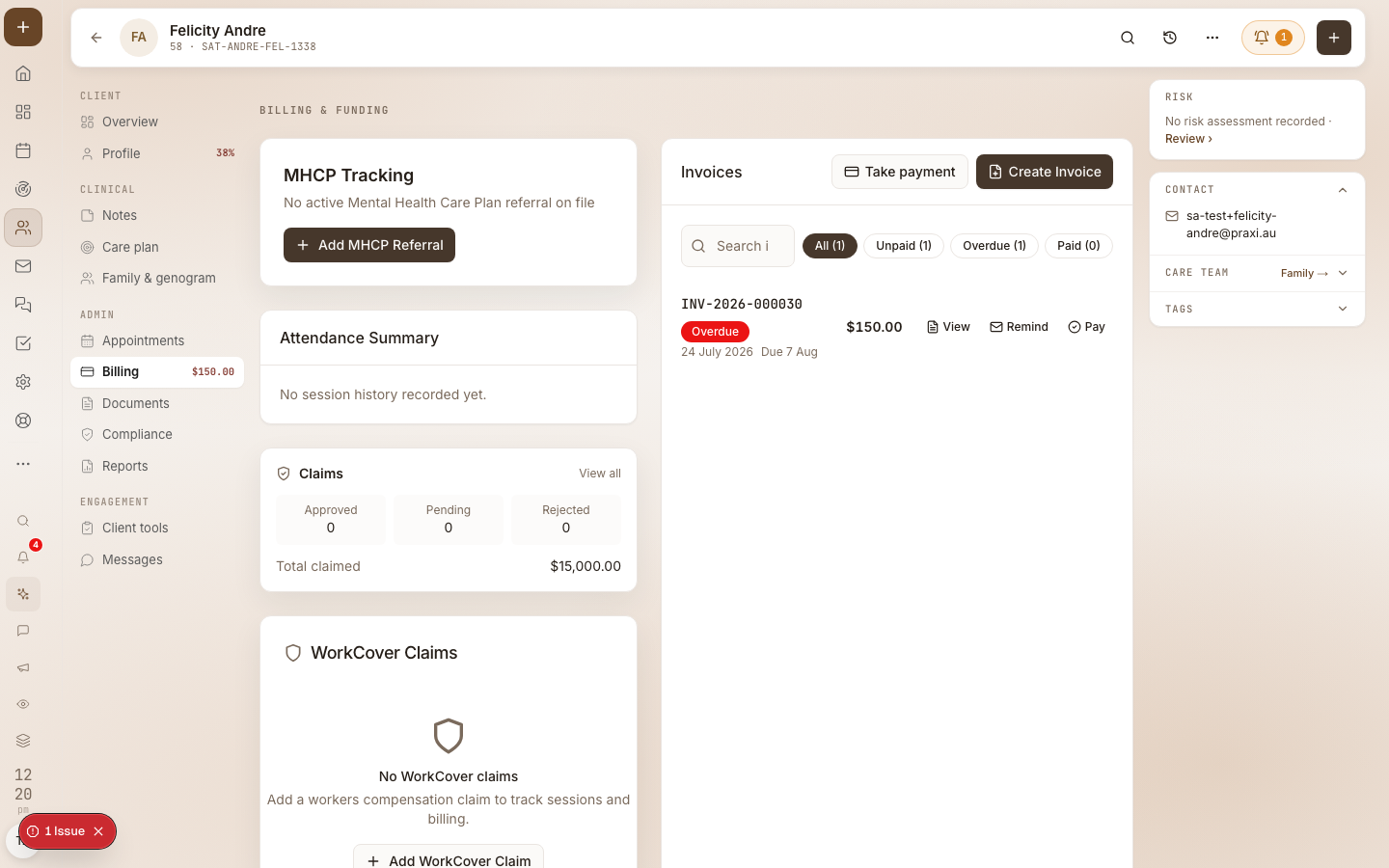
Praxi detects the DVA card type from the client profile. The DVA Details section captures:
- Card type (Gold / White)
- Veteran File Number
- Accepted disabilities (White Card only) — DVA condition code, description, effective dates
When you create an invoice for a DVA-funded service, Praxi automatically selects the DVA item catalogue (different from MBS) and applies card-type rules to the claim panel.
Treatment location code
DVA distinguishes between three treatment locations for psychology services. Praxi captures this on the appointment or invoice:
| Code | Meaning | Notes |
|---|---|---|
| R | Rooms — patient attends the practitioner's practice | Default for in-person psychology sessions |
| V | Visit — practitioner travels to the patient | Required when claiming KM/distance items |
| H | Hospital — service rendered in a hospital setting | Set the hospital indicator on the claim |
If you bill kilometres (item KM or OT80), the treatment location code must be
V. Praxi blocks submission if kilometres are present without V.
Treatment cycles
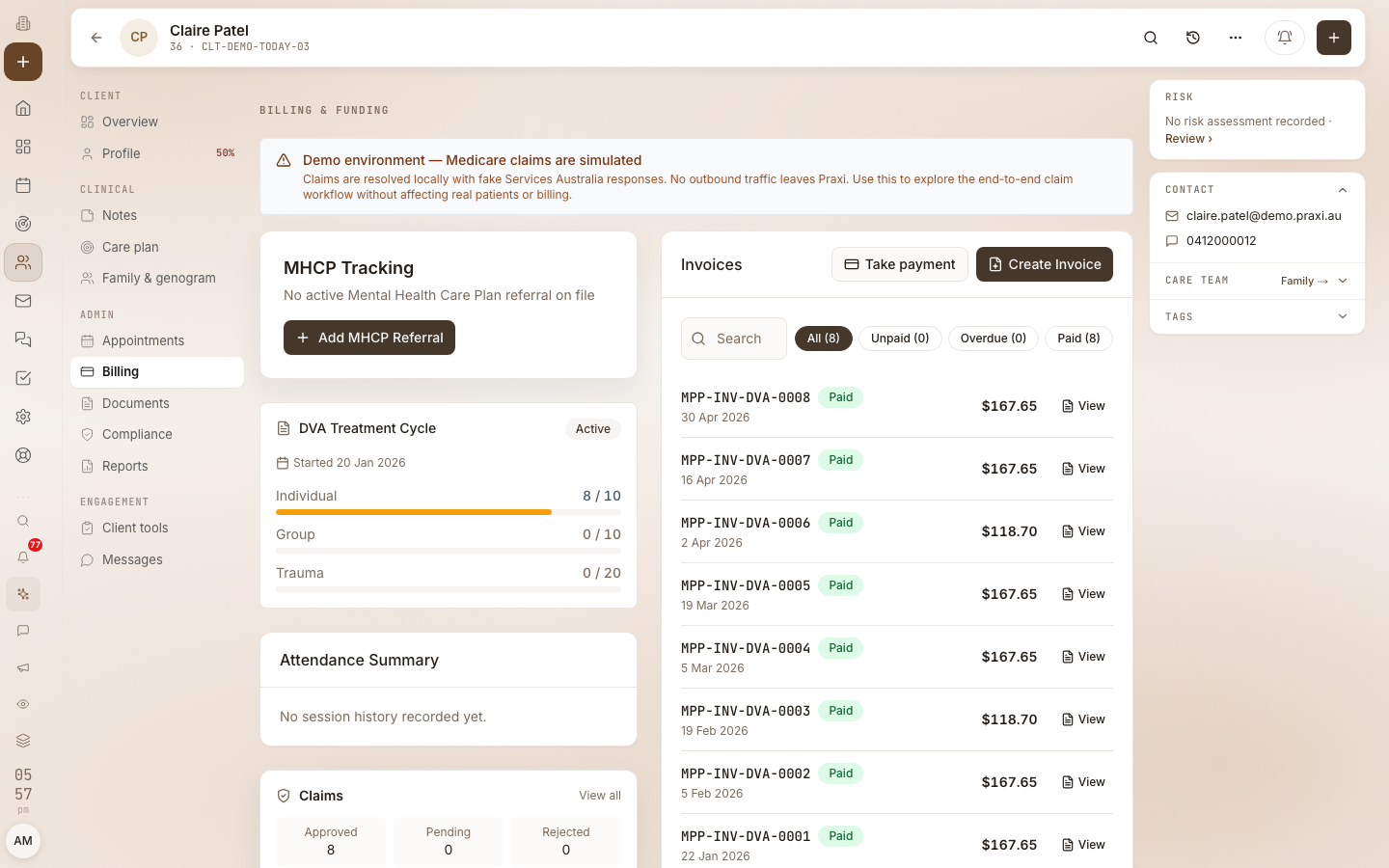
DVA Allied Health Psychology operates on treatment cycles. A cycle is a defined period during which a veteran can access a set number of sessions under a referral. When the cycle ends — either by date or by exhausting allocated sessions — Praxi triggers an End of Cycle Report (ECR).
Praxi monitors treatment cycles via a daily scheduled job that runs at 7am AEST:
- 14 days before cycle end — practitioners receive a notification to plan a renewal or transition
- 7 days before cycle end — second reminder
- 0 days (cycle expired) — Praxi auto-generates the ECR data
The ECR aggregates all paid/assessed claims within the cycle and produces a report with veteran file number, provider number, treatment dates, total sessions, and total benefit. The report is sent to the veteran's referring GP — it is not transmitted to DVA — and sending it marks the cycle as reported. The GP reviews the report and may issue a new referral to begin the next cycle.
DVA has announced removal of the current treatment cycle, a fee increase for allied health, and a $5,000 annual monetary limit / clinical-effectiveness threshold (with clinical-need pathway above). These product behaviours are not live yet. Until commencement and published operational rules, Praxi keeps the 12-session / 12-month + US92 path above. Details:
Referral
DVA psychology claims must include a referral block per TECH.SIS.DVA.02 v1.0.08. The referral fields are:
- Issue date — when the referral was issued
- Period code —
NS(no specified period) orI3(indefinite) - Type code —
Afor Allied Health - Provider number — the referring GP's Medicare provider number
Praxi warns at validation time if the referral is missing. SA will reject the claim outright if you submit without the referral block, so always confirm the referral is on file before submitting.
4. Submitting DVA claims
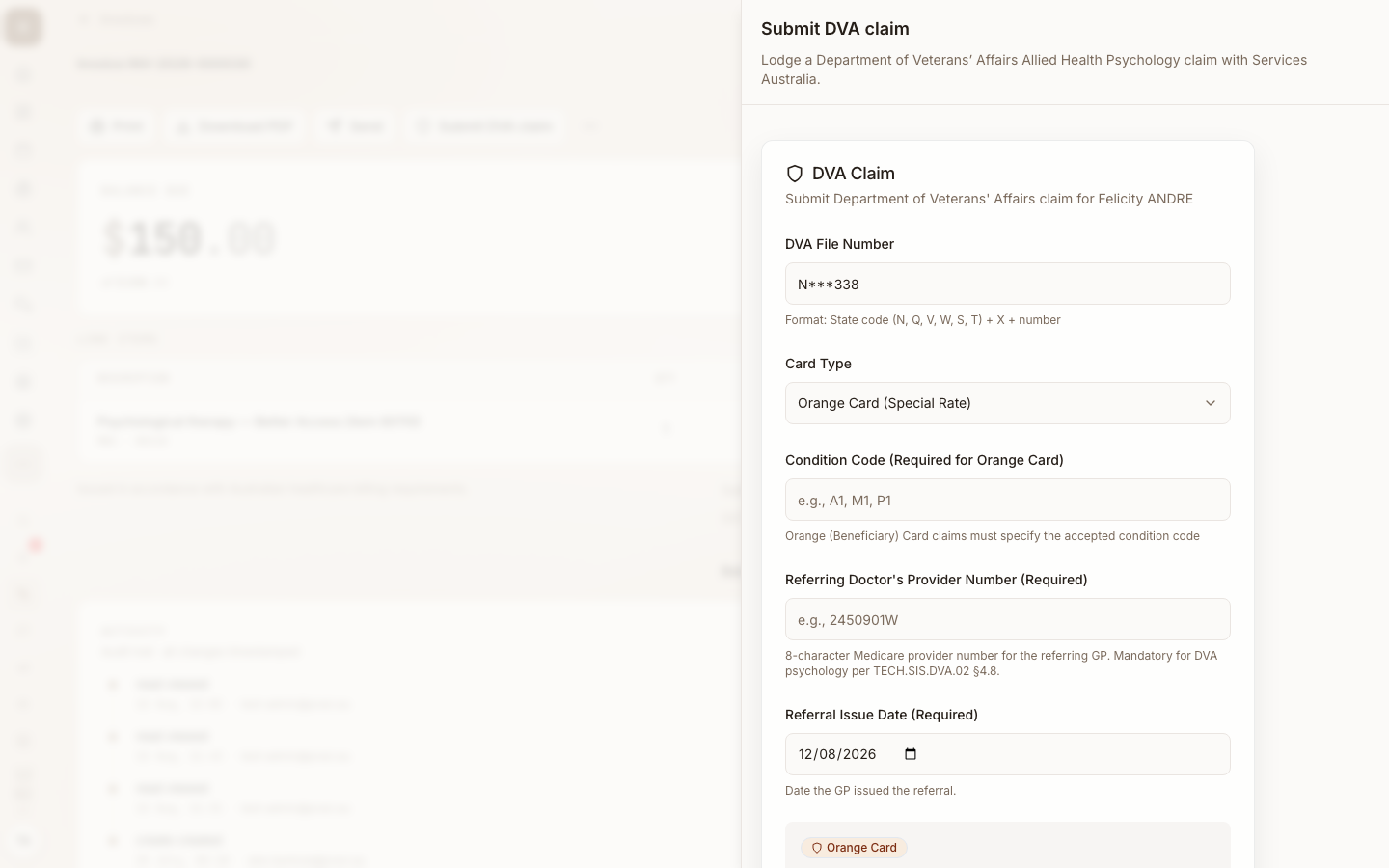
Step-by-step
- Open the DVA-funded appointment or invoice
- Click Submit DVA Claim — the DVA claim panel opens
- Confirm the DVA file number (auto-populated from the client profile)
- Confirm the card type (Gold or White)
- For White Card holders, enter the condition code for the accepted disability the service relates to
- Confirm the referring doctor's provider number and referral issue date
- Review the claim items and charge amounts
- Click Submit Claim
- The result returns within seconds — status, benefit amount, claim reference
What's different from Medicare claiming
| Field | Medicare value | DVA value |
|---|---|---|
| Patient identifier | 10-digit Medicare number + IRN | DVA Veteran File Number |
| Verification | OPVW | OVVW |
| Item catalogue | MBS | DVA Allied Health schedule |
| Patient pays | Possibly (gap) | Never (DVA fully funds) |
| Bank account on claim | Patient (PCI) or practice (BBSW) | Practitioner (always) |
| Required for White Card | Standard rules | Accepted condition code |
| Treatment cycle tracking | No | Yes — ECR triggers on expiry |
Service modifiers
DVA recognises after-hours and public-holiday loadings on certain items. The modifier flags translate to indicator fields in the SA payload:
- After hours — records that the service was after hours
- Public holiday — handled via the item code suffix (consult the DVA
schedule for which items support
Hsuffix)
Apply only the modifier that matches the actual service circumstances. DVA audits modifier use, and incorrect application can trigger a debt notice.
Payee provider rule
If the practitioner who rendered the service and the practitioner who receives the benefit are different (uncommon but possible in group practices with billing arrangements), the payee provider stem must differ from the service provider stem (first 6 characters). If they're the same person, omit the payee provider entirely — Praxi enforces this rule at validation to avoid SA error 2030.
Validation errors
DVA-specific validations Praxi runs before submission:
- Missing DVA file number — required
- Invalid DVA file number format — must match V/N + digits, V/N + digits
- G, or state code + digits
- White Card without accepted disability — White Card claims must include an accepted disability code
- Kilometres without V location — kilometres only valid when treatment location code is V
- V location without kilometres — warning only; visit-type claims typically have travel distance
- Payee provider stem matches service provider — error; omit payee provider when same person
- Missing referral — warning; SA will reject at submission
5. Reports & end of cycle
DVA processing report
Like Medicare BPRW, DVA returns a Processing Report covering claim acceptance/rejection outcomes. Praxi polls for these reports automatically and updates DVA claim statuses as they arrive. View at Finance > Claims.
DVA payment report
The DVA Payment Report confirms benefit deposits to the practitioner's nominated bank account (DVA banking is separate from Medicare HW029 — configured directly with DVA via Provider Connect). The report lists:
- Payment date and total amount
- Per-claim breakdown with claim references
- Any adjustments applied
Open Medicare reports in Praxi at /finance/medicare-reports, then choose
DVA payment report.
End of cycle report (ECR)
When a treatment cycle ends, Praxi generates ECR data automatically via the daily 7am AEST job:
- 14 days before cycle end — notification fires; practitioner sees a reminder banner on the billing dashboard
- 7 days before cycle end — second reminder
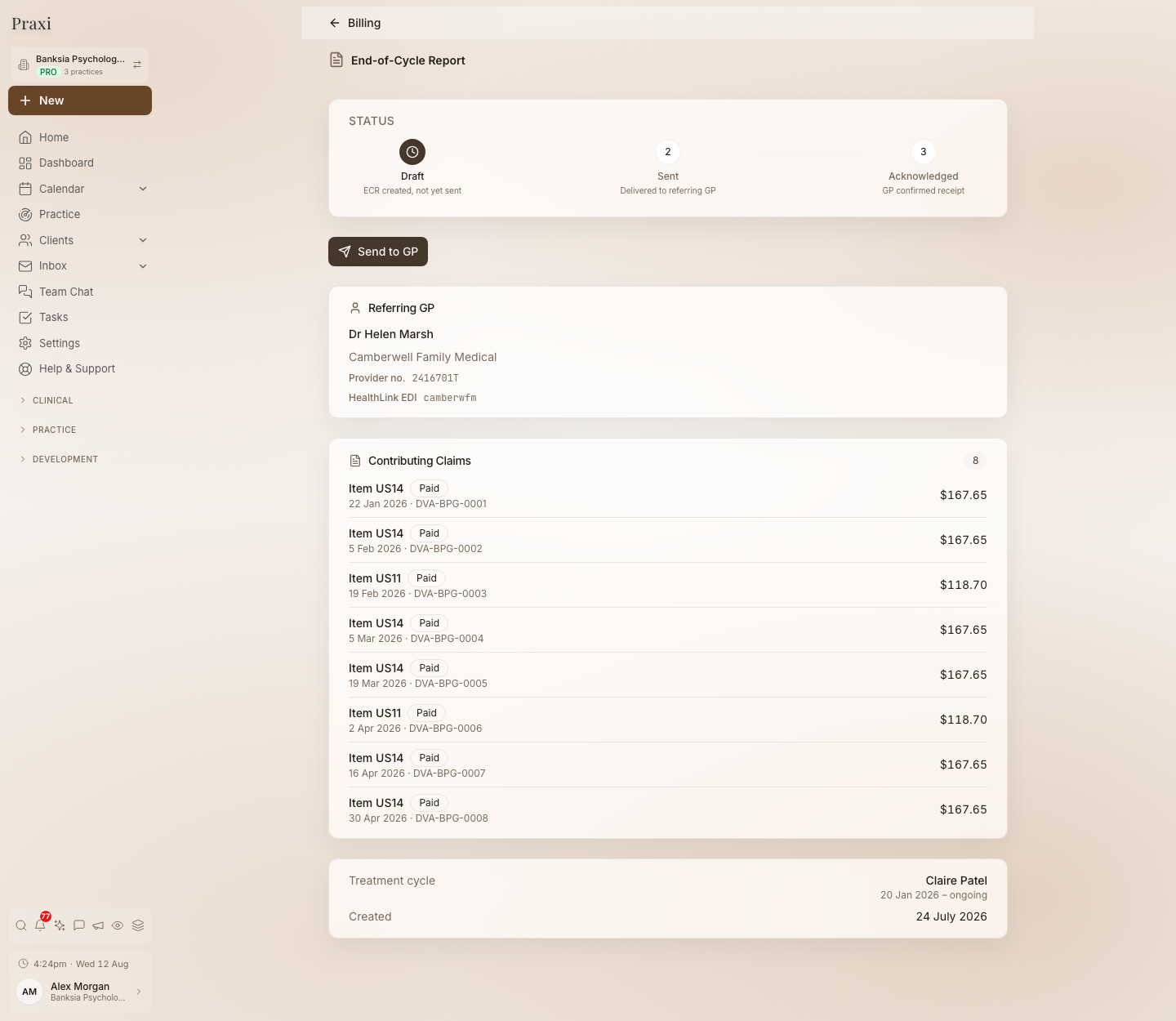
- 0 days — Praxi aggregates all paid/assessed claims in the cycle and generates the ECR (status Draft)
- From the ECR you generate the report and send it to the veteran's referring GP, then mark the cycle as reported. Secure-messaging delivery (HealthLink / Medical Objects) requires that integration to be connected; until it is, download the PDF and send it to the GP manually. The report is not transmitted to DVA — a DVA End of Cycle Report is a clinical report to the referring GP, who may then issue a new referral. The report-preparation fee is DVA item US92 (claimable once per cycle at the current DVA fee schedule rate, after the report has been sent to the GP) — Praxi raises it for claiming through your normal DVA claim workflow.
The ECR contains:
- Veteran File Number
- Service Provider Number
- Treatment start date and treatment end date
- Total sessions within the cycle
- Total benefit paid
To configure ECR notifications:
- Go to Settings > Notifications
- Find DVA Treatment Cycle Expiring under the Compliance category
- Subscribe the relevant practitioners and the practice manager
Cycle expiry notifications are also surfaced on the billing dashboard so the practice can plan referral renewals before the cycle closes — minimising gaps in care for the veteran.
6. Troubleshooting
Common DVA-specific issues
| Symptom | Likely cause | Fix |
|---|---|---|
| "Invalid DVA file number" | VFN doesn't match the regex | Confirm format with the patient's DVA card; remove spaces |
| "White Card claims require an accepted disability" | White Card patient with no accepted disability code on profile | Add the DVA condition code to Client Profile > DVA Details |
| "Kilometres can only be claimed when location is V" | KM/OT80 item but treatment location set to R or H | Change the treatment location to V, or remove the kilometres if not a visit |
| "Payee provider stem matches service provider" | Both numbers refer to the same practitioner | Omit the payee provider field — Praxi handles this when only one practitioner is involved |
| Cycle expiry notification missed | Practitioner not subscribed to DVA Treatment Cycle Expiring | Subscribe in Settings > Notifications |
| OVVW verification fails | VFN, name, or DOB on file doesn't match DVA records | Re-confirm details with the patient; if records have changed, update Praxi to match |
When to call DVA
For DVA-specific issues (eligibility, accepted disabilities, treatment cycle allocations, ECR queries), contact DVA directly:
- DVA General Enquiries: 1800 555 254
- Provider line: access via Provider Connect
For Services Australia / PRODA / MCOL gateway issues, the same numbers as Medicare apply: 132 150 (Provider Enquiries) or 1800 700 199 (Health Professional line).
Related resources
- Medicare Claiming — the core claiming reference
- Medicare Setup — connecting Praxi to Medicare
- Medicare Claiming User Guide — Setup, prerequisites, full claiming overview
- Bulk Bill Workflow (BBSW) — Medicare bulk billing
- Patient Claim Workflow (PCI) — Medicare patient claiming
- DVA Claims (Feature Reference) — Feature overview
- Medicare Error Codes — Full rejection code reference
This guide reflects the TECH.SIS.DVA.02 v1.0.08 specification. DVA policies and item schedules change — refer to the allied health fee schedules and the Provider Connect portal for the latest.