Patient claim workflow (PCI)
Praxi is completing Services Australia conformance testing for Medicare Online Claiming. Production claiming becomes available once Services Australia grants the Notice of Integration (NOI). This page describes how the workflow operates so your practice can prepare; we will update it when certification completes.
This guide walks practitioners and reception staff through the Patient Claim Interactive (PCI) workflow — the Medicare channel used when the patient pays a fee at the time of service and the rebate goes to the patient's bank account. It covers the differences from the bulk bill workflow, how the four synchronous statuses work, and how to confirm or abandon a PENDABLE claim within the 1-hour window.
For initial Medicare integration setup, start with the Medicare Claiming User Guide. For bulk bill claims (no patient gap), see the BBSW workflow.
1. Overview
What is PCI?
Patient Claim Interactive (PCI) is the Services Australia channel used when:
- The patient pays the practitioner a fee at the time of service
- The fee may be the schedule fee (Fully Paid) or partially paid (Part Paid)
- The Medicare rebate goes back to the patient's nominated bank account
- An assessment outcome is returned immediately (within seconds)
Unlike BBSW, PCI is synchronous. When you click Submit Claim, you receive an actual assessment response while the patient is still at reception or on the screen. This is the right channel for private billing with a gap payment, fully paid private practice, and any case where the practitioner charges above the Medicare schedule fee.
Key Services Australia terms
| Term | Meaning |
|---|---|
| PCIW | Patient Claim Interactive Workflow — the synchronous patient-claim channel |
| OPVW | Online Patient Verification Workflow — pre-claim eligibility check |
| EFT | Electronic Funds Transfer — the patient's bank account where the rebate is paid |
| BSB | Bank-State-Branch — 6-digit Australian bank routing code |
| OMSN | Original Medicare Safety Net — first annual gap threshold |
| EMSN | Extended Medicare Safety Net — second, higher annual gap threshold |
| PENDABLE | Status: SA can process the claim but needs explicit practitioner confirmation |
| PENDED | Status: a PENDABLE claim was confirmed and is now in queue for final assessment |
Fully paid vs part paid
| Claim type | What the patient paid | When to use |
|---|---|---|
| Fully Paid | The full charged fee (schedule fee + any gap) | Standard private billing — patient pays the practice in full at reception |
| Part Paid | Only part of the fee; the rest is owed by the patient | Patient pays a deposit; balance owed becomes a separate gap to chase |
Both use the patient-claim channel; choose the option that matches the payment.
2. Prerequisites
Confirm Medicare setup is finished for the provider and location. Check the client's Medicare details, MBS item and any required referral. Use Patient claims for the invoice submission steps.
3. Pre-claim checklist
The pre-claim checks are the same as BBSW. The summary below highlights what differs for PCI:
Patient verification (OPVW)
Identical to BBSW — the OPVW must be fresh (≤24 hours old) before submission. See BBSW pre-claim verification for the full flow.
MBS item eligibility
Same MBS item rules apply. The only difference: for PCI, the schedule fee matters because it determines the rebate amount returned to the patient. The practitioner's charge can exceed the schedule fee (that's the gap), but the rebate is calculated on the schedule fee.
Referral check
Same Better Access referral rules apply for PCI claims as for BBSW — referrals must be current and the referring GP's provider number must be on file.
Age and claimant rules
Same Health Insurance Act 1973 minor rule: patients under 14 require a claimant. For PCI, the claimant block in the SA payload is at the top level of the request (whereas in BBSW it sits inside the medical event). Praxi handles the placement automatically; you fill in the same claimant fields on the panel.
Bank account capture
Unique to PCI: the patient bank account section appears on the claim panel when claim type is set to Fully Paid or Part Paid. Capture the patient's BSB, account number, and account name. The rebate is deposited directly to this account, typically within 1-3 business days of claim acceptance.
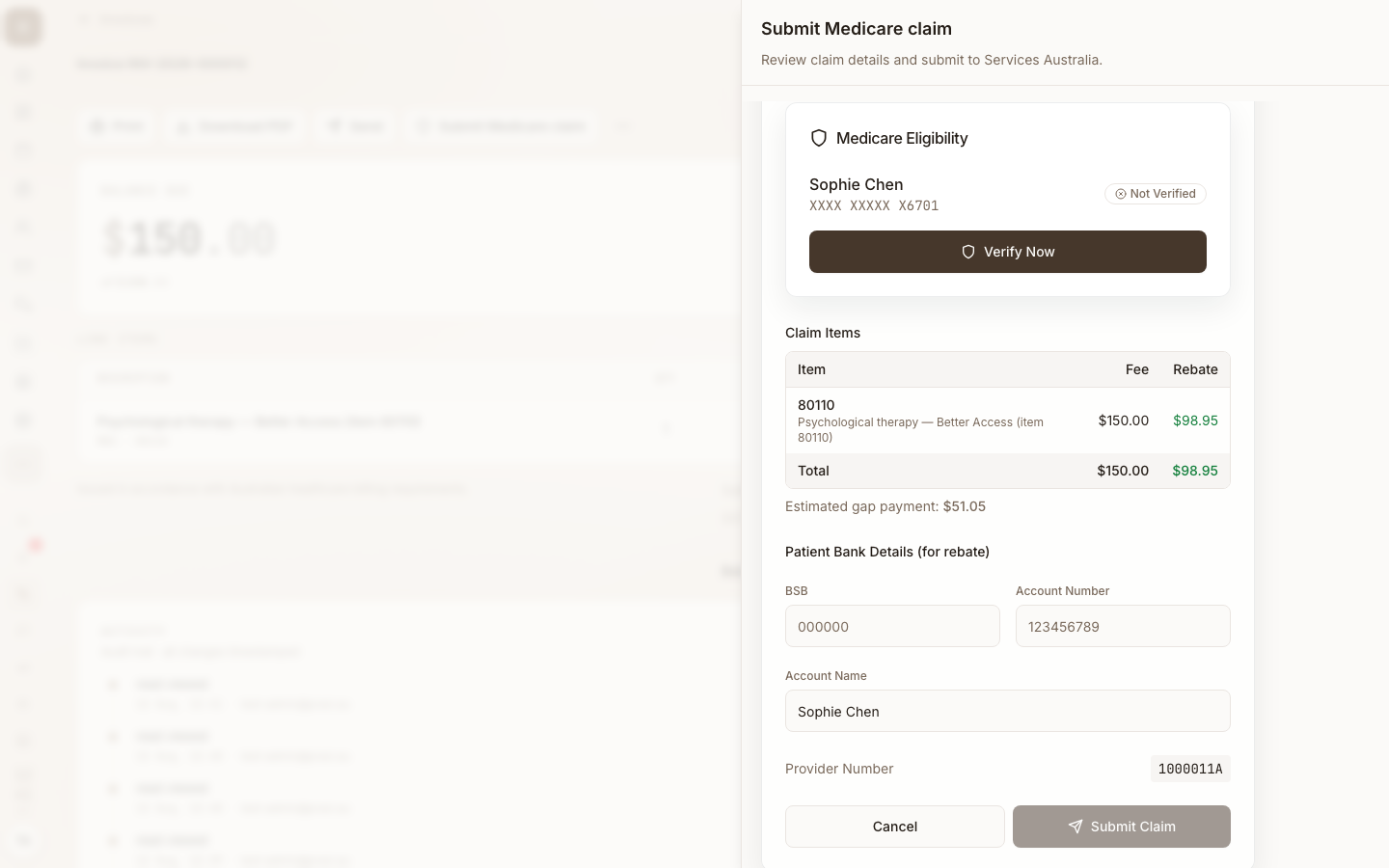
For repeat private clients, ask reception to record the bank account on the client profile. Praxi will pre-fill it automatically on subsequent PCI claims, removing a step from every reception checkout.
4. Submitting the claim
Step-by-step
- Complete the appointment and create the invoice
- Take payment from the patient (cash, card, EFTPOS, payment plan)
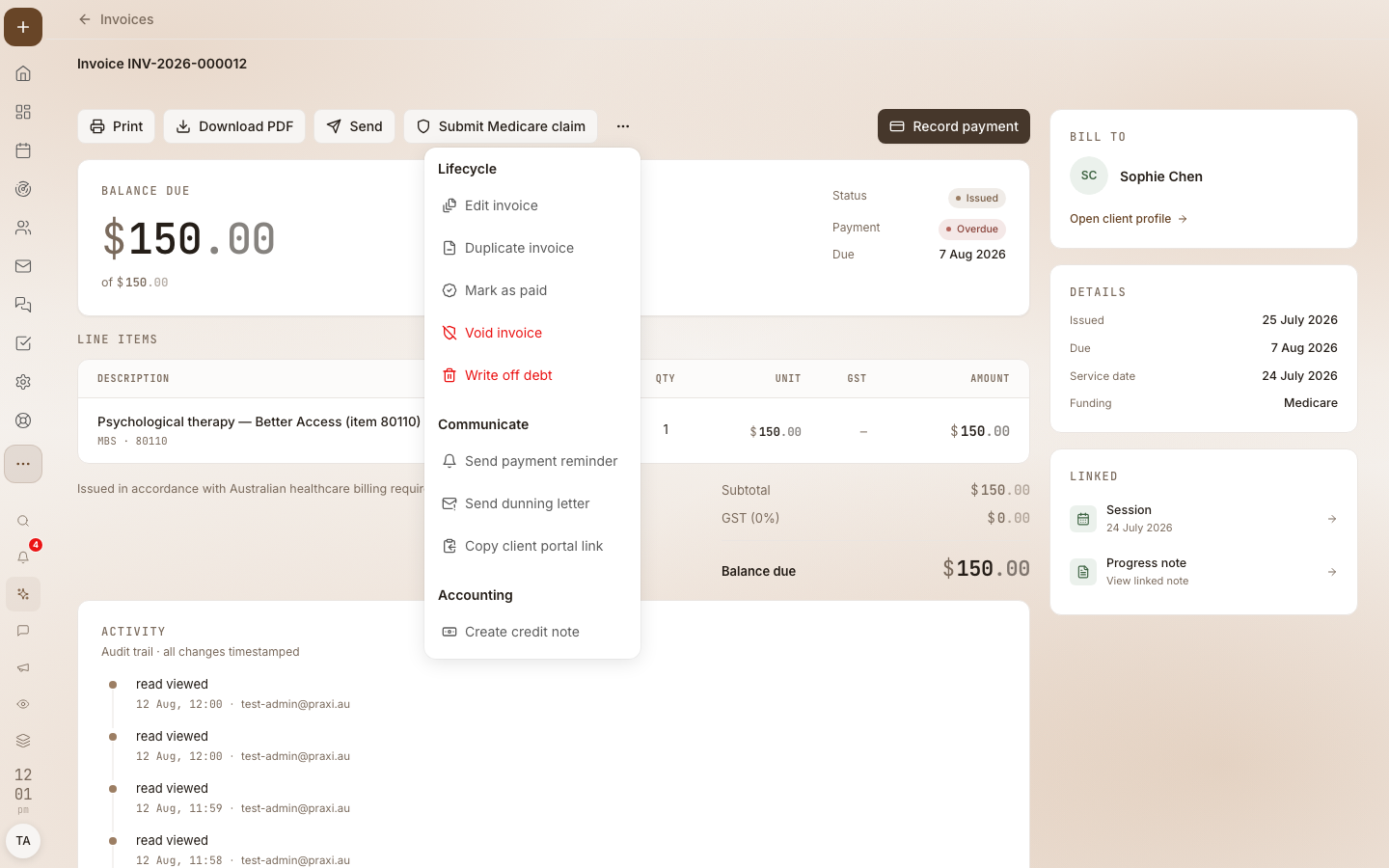
- Open the invoice and click Submit Medicare Claim
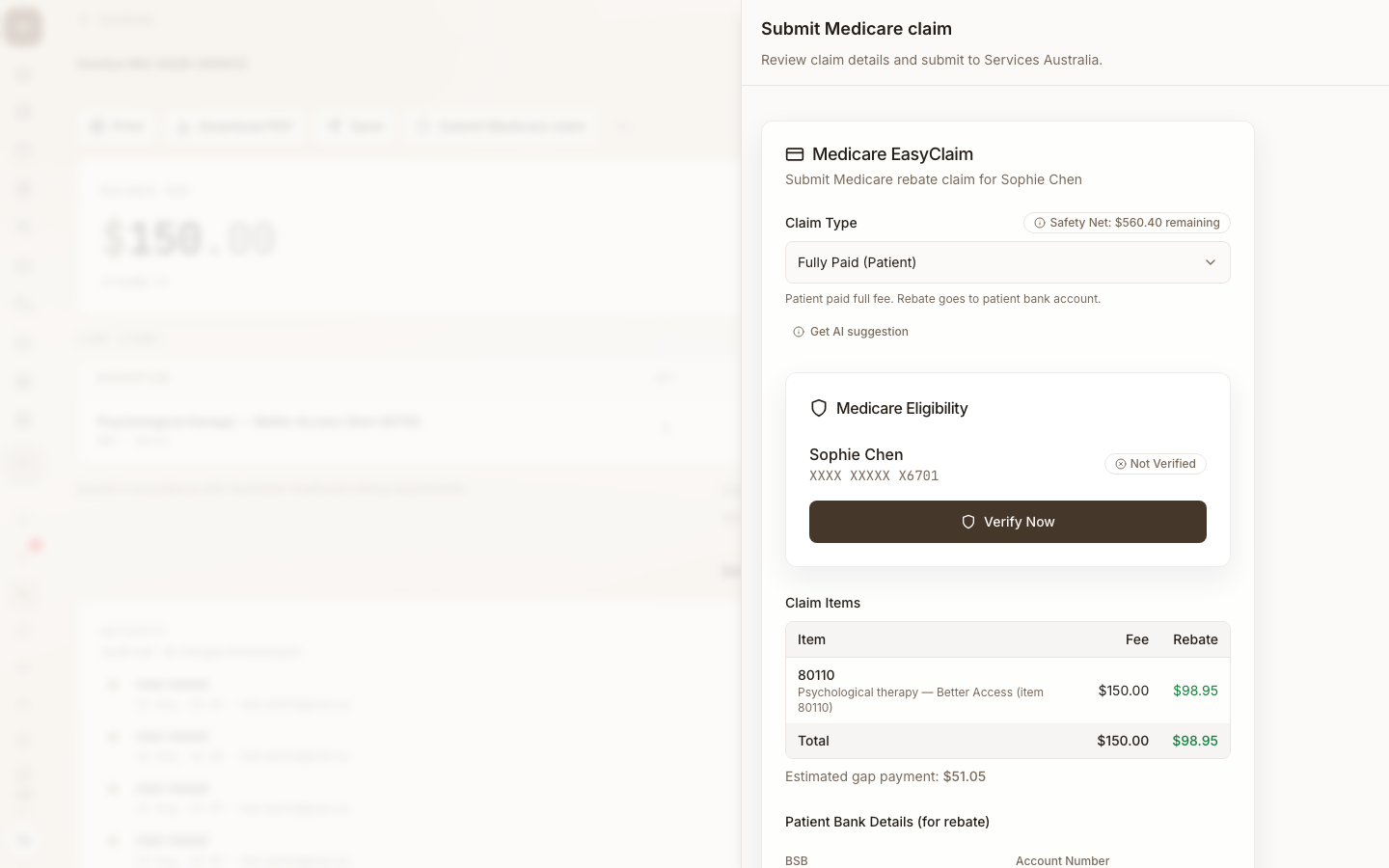
- In Claim Type, select Fully Paid or Part Paid
- Confirm patient verification status is Verified
- Confirm or enter the patient's bank details (BSB, account number, name)
- Confirm the items table — MBS item, charge amount, schedule fee, expected rebate
- Click Submit Claim
- The result returns within seconds — the panel shows the claim status, the benefit amount, and the SA claim reference
No DB4 consent for PCI
DB4 (Assignment of Benefit) consent is only required for bulk bill claims. For PCI claims the patient is not assigning the benefit to the practice — the rebate goes back to them — so there is no consent capture step. Praxi's claim panel hides the consent card automatically when claim type is Fully Paid or Part Paid.
Validation errors
In addition to the BBSW validation rules, PCI submissions can be blocked by:
- Bank account required — BSB and account number must be present
- BSB format — must be exactly 6 digits
- Account number format — 6 to 9 digits, numeric only
If validation fails, the field is highlighted on the panel with the specific correction needed.
5. After submission — the four statuses
PCI is synchronous. The response Praxi receives within seconds maps to one of four statuses. The claim panel updates immediately to show which outcome applies.
Status reference
| Status | Meaning | What you do |
|---|---|---|
| Assessed | SA accepted the claim. Benefit will be paid to the patient's bank account | None — the rebate lands in the patient account in 1-3 business days |
| Rejected | SA refused the claim. A reason code is attached | Review the reason, fix the issue, Fix and Resubmit |
| Pendable | SA can process the claim but needs explicit practitioner confirmation within 1 hour | Review the assessed benefit amount; click Confirm Pend or Abandon |
| Pended | A PENDABLE claim that was confirmed; queued for final processing by SA | Wait for the final outcome via processing reports |
Statement of claim & benefit payment
For an Assessed PCI claim, Praxi can generate a Statement of Claim and Benefit Payment PDF on demand. This is the document the patient may need for private health insurance gap submission or for tax records.
- Open the invoice for the assessed claim
- Click SA Statement
- Praxi produces a PDF showing item details, schedule fees, benefit amount, payment destination
- Download or email the PDF to the patient
Handling PENDABLE claims
PENDABLE is the trickiest PCI outcome. SA returns this status when:
- The benefit amount differs from what was expected (e.g. card details have changed mid-cycle)
- The patient's record needs additional verification
- The claim requires manual review at SA's end
When a PCI claim returns PENDABLE, Praxi:
- Records the claim with status
PENDABLEand the SA correlation ID - Surfaces a Pendable Claim Alert on the billing dashboard with a live countdown timer
- Sends an in-app notification to the practitioner who submitted the claim
- Highlights the alert in red when fewer than 10 minutes remain
You have exactly 1 hour from submission to confirm or abandon the PENDABLE claim. After 1 hour, the claim expires and must be resubmitted from scratch.
To confirm:
- Open Finance > Claims or the appointment with the pendable alert
- Review the assessed benefit amount displayed in the alert
- Click Confirm Pend to accept the assessment as offered
- The claim status changes to
PENDEDand is queued for final SA assessment - The final outcome arrives via a processing report (typically minutes to hours later)
To abandon:
- Click Abandon on the alert
- Confirm in the dialog — the action is irreversible
- The claim is cancelled. The patient may need to be re-billed if you re-submit later
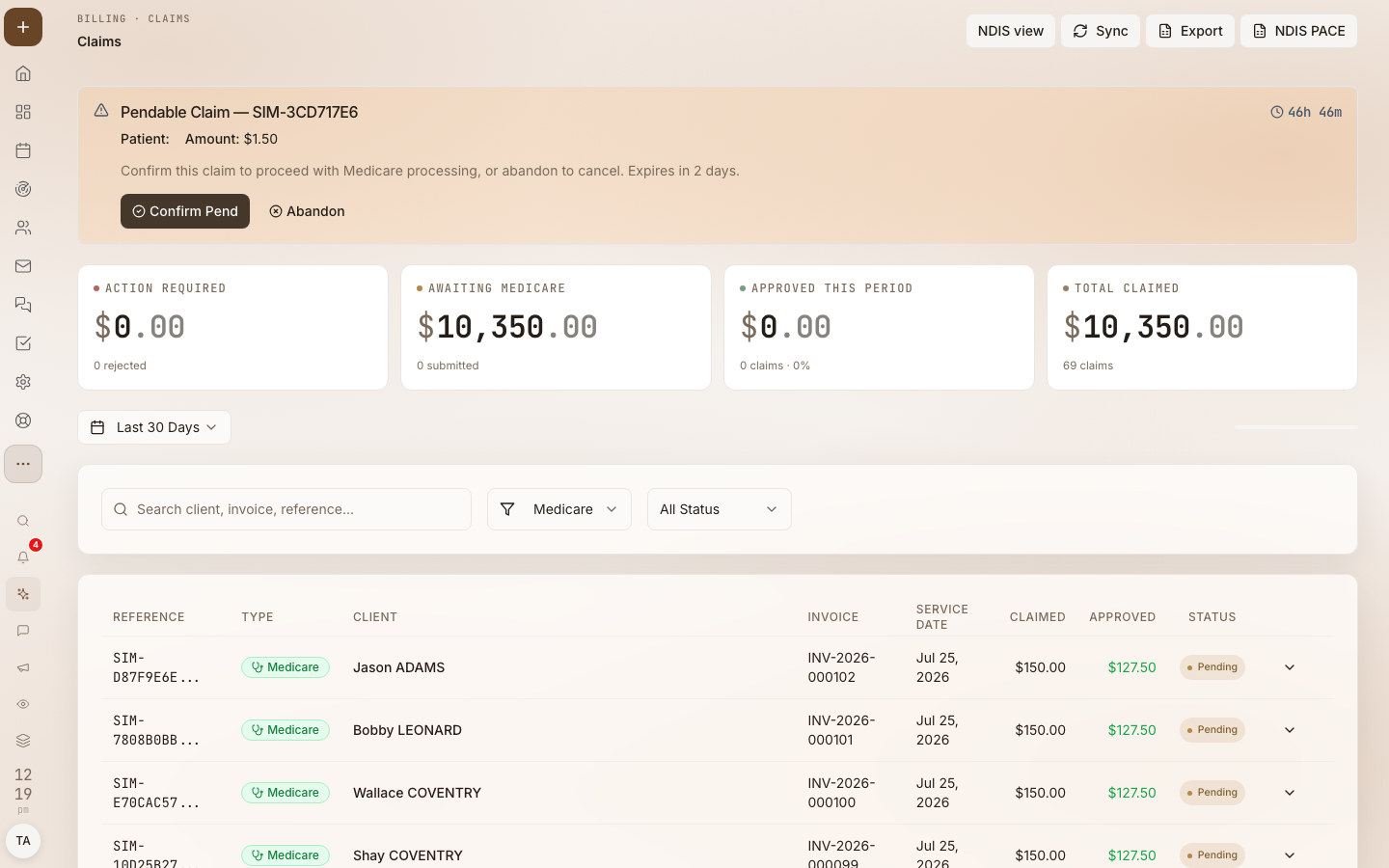
A PENDABLE claim that expires must be resubmitted from scratch — that's another set of verification, consent (n/a for PCI), and validation steps, plus delayed payment to your client. Reception should check the Medicare Claims dashboard hourly during clinic.
Same-day delete window
If you submit a PCI claim and realise on the same day it was wrong, you can delete it via the same-day delete (SDDW) flow:
- Open the invoice for the claim
- Open the More Actions menu (⋯) on the invoice
- Select Same-day delete (Medicare PCI)
- Confirm
The window closes at midnight AEST (the SA same-day boundary uses Australian Eastern Standard Time regardless of practice timezone). After midnight you cannot delete the claim through Praxi — call SA Provider Enquiries (132 150) for a manual adjustment.
Same-day delete only works while the claim is in PENDABLE, PENDED, or
ASSESSED status. Already-paid claims cannot be same-day deleted.
Medicare Safety Net implications
When a patient's out-of-pocket gaps reach the OMSN or EMSN annual threshold, the Medicare benefit for subsequent services increases. Praxi tracks each client's progress towards the threshold based on the gap amounts recorded on PCI claims — the safety net is only relevant to claims with a gap, which is why it appears in PCI workflows but not BBSW.
When SA returns a benefit amount that reflects a safety net adjustment, the claim panel shows the increased rebate. No action is required from the practitioner — Praxi reflects the SA-calculated amount as-is.
6. Troubleshooting
Resolve a rejection
Read the returned Services Australia message on the claim. Follow Medicare claiming errors for guidance before correcting and resubmitting.
How to resubmit
The resubmission flow for PCI is the same as for BBSW — see
BBSW resubmission. Only claims in
REJ, NAC, or NOBB status can be resubmitted. PCI claims that are
PENDABLE or PENDED cannot be resubmitted; they must run through the
confirm/abandon flow first.
When to call Services Australia
Same as BBSW — call 132 150 (Provider Enquiries) for systemic issues, or 1800 700 199 (Health Professional line) for PRODA-specific issues. Refer to BBSW troubleshooting for the full criteria.
Related resources
- Medicare Claiming — the core claiming reference
- Medicare Setup — connecting Praxi to Medicare
- Medicare Claiming User Guide — Setup, prerequisites, full claiming overview
- Bulk Bill Workflow (BBSW) — When you bulk bill
- DVA Claim Workflow — Veterans claiming
- Medicare Error Codes — Full rejection code reference
- Medicare Troubleshooting — General troubleshooting FAQ
- Reconciliation — Matching SA payments to claims
This guide reflects Services Australia's TECH.SIS.MEDICARE.04 (PCIW) specification. Policies and procedures change — refer to the Services Australia website for the latest.