Billing Overview
Praxi provides a comprehensive billing system designed for Australian healthcare practices, with native support for Medicare, DVA, NDIS, and private billing. The system handles the complexity of Australian healthcare funding while maintaining compliance with ATO, AHPRA, and Medicare requirements.
Quick start: new to Praxi billing? Complete these setup steps in order:
- Configure your ABN and business details
- Set up Medicare credentials (if applicable)
- Connect your payment gateway (Stripe, Tyro, Square, or HICAPS)
- Link your accounting software (Xero or MYOB)
Key Features
| Feature | Description |
|---|---|
| Medicare Claiming | MCOL and Tyro claiming with eligibility checks |
| DVA Billing | Direct billing for veterans via MCOL |
| NDIS Invoicing | Plan-managed, self-managed, and NDIA-managed support |
| Private Health Claiming | Real-time claiming via Tyro HealthPoint and HICAPS |
| Private Billing | Gap payments, fee schedules, and receipts |
| Batch Processing | Bulk invoice generation and claiming |
| Payment Plans | Automated recurring payments with retry logic |
| Recurring Billing | Automatic invoicing for subscriptions and room rentals |
| Quotes | Generate, send, and convert quotes to invoices |
| Commission Tracking | Automatic practitioner commission calculation |
| Split Payments | Multiple payment methods on a single invoice |
| Statements | Activity, outstanding, and annual tax statements |
| Dunning | Three-stage debt collection letters and escalation |
| Stored Payment Methods | Securely save client card details for future payments |
| Financial Reports | Revenue, aged receivables, BAS, and tax summaries |
Billing Workflow
Appointment → Invoice Generated → Payment Collected → Reconciled
     ↓              ↓                   ↓                ↓
  Service      Funding Source      Gateway/Cash      Reports
  Recorded     Applied             Processed         Updated
Automatic Invoice Generation
Praxi can automatically generate invoices when appointments are marked as attended:
- Appointment completed and marked attended
- System checks client's funding sources
- Invoice created with appropriate item numbers
- Sent to billing queue or claimed immediately
Manual Invoice Creation
For services outside appointments:
- Go to Finance > Invoices
- Click New Invoice
- Select client
- Add line items
- Apply funding source
- Save or send
Funding Sources
Praxi supports multiple Australian healthcare funding sources:
Medicare
Direct MCOL claiming is completing Services Australia conformance testing and becomes available once the Notice of Integration (NOI) is granted.
- Online claiming via MCOL (Medicare Online Claiming) as the primary gateway, with Tyro Health as an optional alternative
- Automatic gateway fallback if the primary gateway is unavailable
- Real-time eligibility checks
- AI-assisted MBS item suggestions based on appointment details
- Session tracking (10 individual + 10 group per calendar year)
- Bulk billing and patient claim (gap payment) options
DVA (Veterans' Affairs)
- Gold and White card support
- Direct billing to DVA via MCOL (primary) or Tyro Health (optional)
- 12-session treatment cycle tracking with End of Cycle reports
- Prior approval workflow for treatment extensions beyond 12 sessions
- Condition-specific tracking for White cards (accepted disability required)
- No gap charging -- DVA schedule fee is the total fee
NDIS
- Self-managed participant invoicing
- Plan-managed invoicing
- NDIA-managed PACE-compliant CSV export for myplace portal submission
- Budget tracking and alerts
- Automatic pricing updates from the NDIS Price Guide
- Service agreement management (create, send for signature, track)
- 90-day submission window enforcement
Private Health
- Real-time claiming via Tyro HealthPoint and HICAPS terminals
- Instant rebate estimates (pre-claim check)
- Digital claiming (SMS to patient) and terminal-based claiming
- Gap payment management
- Supported health fund directory with eligibility checking
- Rebate learning -- Praxi learns rebate amounts from approved claims over time and provides instant estimates before submission
WorkCover
- State-based scheme support (all states and territories including Comcare)
- Pre-approval tracking
- Insurer direct billing
- AI-assisted report generation with state-specific templates
Invoice Lifecycle
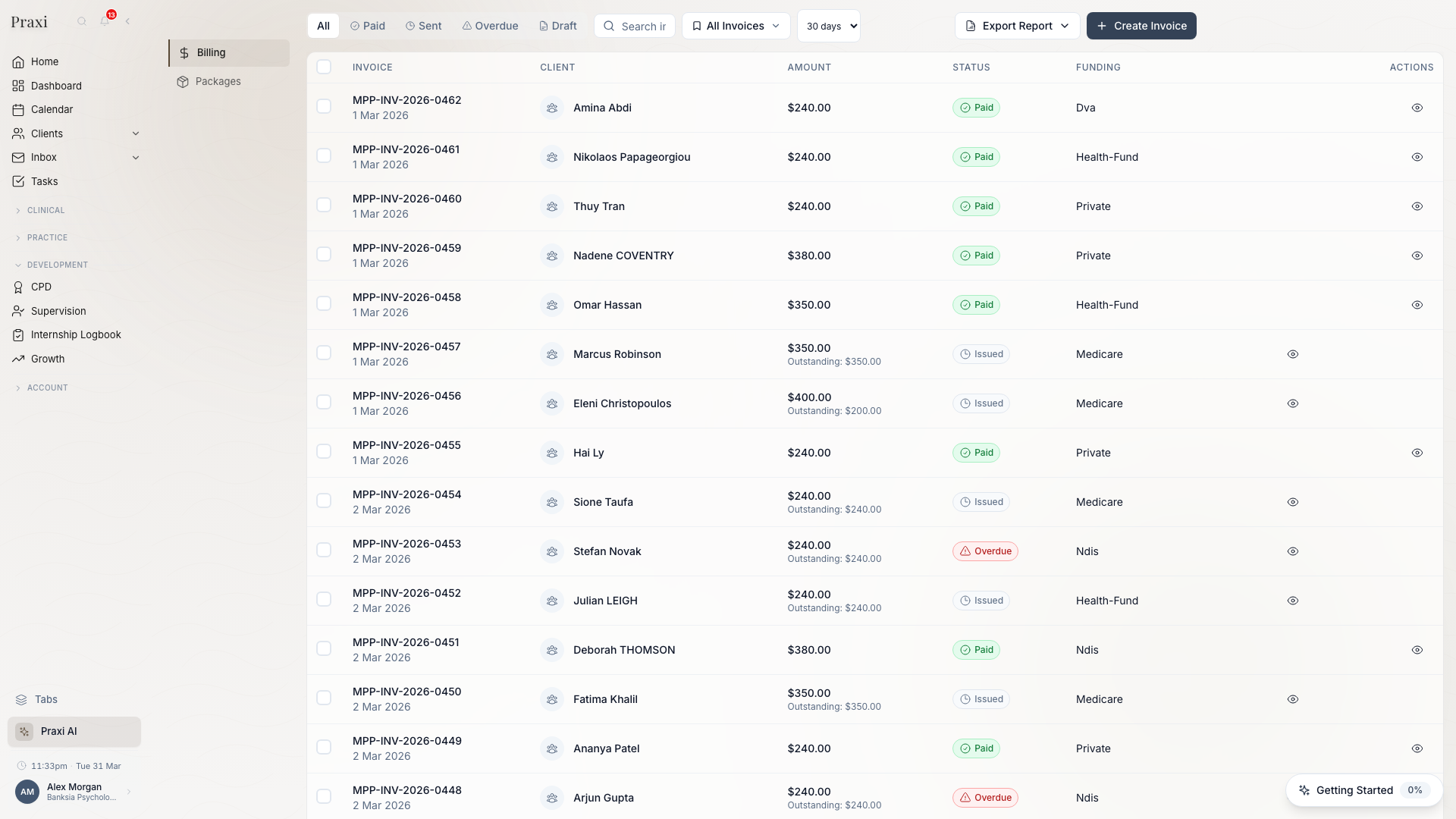
| Status | Description | Actions Available |
|---|---|---|
| Draft | Invoice created, not yet sent | Edit, delete, send |
| Sent | Delivered to client/payer | Resend, record payment |
| Partially Paid | Some payment received | Record additional payment |
| Paid | Fully paid | Refund, export |
| Overdue | Past due date | Send reminder, add to plan |
| Void | Cancelled | None (audit trail retained) |
Payment Methods
Integrated Payments
| Provider | Features |
|---|---|
| Stripe | Cards, Apple Pay, Google Pay, payment plans |
| Tyro | EFTPOS, Medicare Easyclaim, HealthPoint |
| Square | Square Terminal in-person payments |
| HICAPS | Private health fund claiming |
Manual Recording
For payments outside integrated systems:
- Cash
- Bank transfer
- Cheque
- BPAY
Split Payments
Combine multiple payment methods on a single invoice (e.g., HICAPS rebate + card gap payment, or cash + card). All payments in a split are processed atomically -- if one fails, all are rolled back.
QR and SMS Payment Links
Send payment links to clients via SMS or generate QR codes for quick payment at reception.
Tax Configuration
GST Settings
Most healthcare services are GST-free under the GST Act 1999. GST settings are configured as part of your business details at:
| Service Type | GST Treatment | ATO Reference |
|---|---|---|
| Clinical services | GST-free | Division 38-7 |
| Reports (non-clinical) | GST applicable (10%) | Standard supply |
| Products (e.g., books, aids) | GST applicable (10%) | Standard supply |
| Supervision | GST-free | Educational |
| Medico-legal reports | GST applicable (10%) | Non-therapeutic |
| Cancelled appointments (late fees) | GST applicable (10%) | Penalty charge |
GST registration: if your practice's annual turnover exceeds $75,000, you must register for GST. Healthcare services remain GST-free regardless of registration status, but you can claim GST credits on business expenses.
ABN Display
Your ABN appears on all invoices as required by Australian tax law. For invoices over $1,000 (including GST-free supplies), you must include:
- Your ABN
- Supplier name (practice name)
- Date of issue
- Description of services
- Total amount
Update your business details at:
Settings → Organisation → Business Details
BAS Preparation
Praxi generates GST reports aligned with ATO BAS requirements:
- Go to Billing → Tax Reports
- Select reporting period (monthly or quarterly)
- Review the totals: total sales (including GST-free healthcare), GST-free sales, taxable sales, and GST on sales
- Hand the figures to your accountant for lodgement -- confirm with them which ATO BAS labels your GST-free healthcare sales belong at when copying into the ATO form
Tax Year Summary
Generate comprehensive financial year summaries including income by funding source, GST quarterly breakdown, and key tax dates. Export as PDF, CSV, or JSON from Billing → Tax Reports → Tax Year.
Accounting Integration
Praxi integrates with Australian accounting software:
Xero
- Invoice sync (Praxi to Xero, one-way push)
- Payment recording
- Contact matching
- Chart of accounts mapping
Integration note: Xero and MYOB integrations provide invoice and payment synchronisation from Praxi. If the accounting service is temporarily unavailable, data is queued and synced when the connection is restored. See individual setup guides for current capabilities.
MYOB
- Invoice export (Praxi to MYOB)
- Payment sync
- Contact management
See Xero Setup and MYOB Setup for configuration.
Dashboard Metrics
The billing dashboard shows:
Revenue
- Today's invoiced amount
- This week/month totals
- Year-to-date revenue
- Comparison to previous periods
Outstanding
- Total unpaid invoices
- Overdue amounts
- Aged receivables summary
Claiming
- Medicare claims pending
- DVA claims status
- NDIS invoices awaiting payment
Quick Actions
Access common tasks from the billing dashboard:
| Action | Description |
|---|---|
| Generate Invoices | Batch create from attended appointments |
| Process Medicare | Submit pending Medicare claims |
| Send Reminders | Email overdue invoice reminders |
| Export Period | Download invoices for accounting |
Permissions
Billing access is controlled by role:
| Role | Access Level |
|---|---|
| Practice Owner | Full access including refunds |
| Practice Manager | Full access including refunds |
| EAP Administrator | Full access including claiming |
| Accountant | Full access |
| Practitioner | View and bill own clients' invoices |
| Receptionist | Create invoices, record payments |
Getting Started
- Configure funding sources - Funding Sources
- Set up payment gateway - Stripe Setup
- Connect accounting - Xero Setup
- Learn invoice management - Invoice Management
Compliance Considerations
Record Keeping
Australian healthcare billing records must be retained for:
| Record Type | Retention Period | Requirement |
|---|---|---|
| Tax invoices | 5 years | ATO requirement |
| Medicare claims | 2 years | Medicare Australia |
| Clinical records | 7 years (adults), until age 25 (minors) | AHPRA |
| NDIS service records | 7 years | NDIS Quality Standards |
Praxi automatically maintains audit trails and archives for compliance.
Privacy Act Compliance
Billing data containing client information is protected under the Privacy Act 1988 (as amended by the Privacy Act 2025):
- Invoices sent via encrypted channels
- Payment details stored with PCI-DSS compliance
- Client billing history access-controlled
- Third-party sharing (plan managers) with consent only
- Right to erasure requests handled through Praxi's ErasureRequest workflow (see Data Retention for details on erasure exceptions for billing records)
Medicare Compliance
When billing Medicare:
- Services must be clinically necessary
- Referrals must be valid and current
- Item numbers must accurately reflect service provided
- Session limits must be observed
- Records must support the claim
Compliance: incorrect Medicare claims can result in debt recovery, penalties, and loss of provider status. Always verify eligibility before claiming.
Tips
- Enable automatic invoicing - Reduces admin time significantly
- Set up reminders - Automated overdue reminders improve collection rates by up to 40%
- Review aged receivables weekly - Catch issues before they become bad debts
- Reconcile regularly - Weekly reconciliation prevents month-end chaos
- Use bulk operations - Process end-of-month in minutes, not hours
- Verify Medicare eligibility - Check before appointments to avoid rejected claims
- Keep referrals current - Set up expiry alerts 30 days before referral end dates